
Archives


How to Calculate total time taken for particular method in Spark[Code Snippet]
In some cases where you applied Joins in the spark application, you might want to know the time taken to complete the particular join. Below code snippet might come in handy to achieve so. import java.util.Date val curent = new Date().getTime println(curent) Thread.sleep(30000) val end = new Date().getTime println(end) println("time taken "+(end-curent).toFloat/60000 + "mins") Output: import java.util.Date curent: Long = 1520502573995 end: Long = 1520502603996 time taken 0.5000167mins All you need to do is get current time before method starts and get current time after method ends, then calculate the difference to get total time taken to complete that particular method. Hope this code snippet helps!!
How to write current date timestamp to log file in Scala[Code Snippet]
Scala doesn’t have its own library for Dates and timestamps, so we need to depend on Java libraries. Here is the quick method to get current datetimestamp and format it as per your required format. Please note that all the code syntaxes are in Scala, this can be used while writing Scala application. import java.sql.Timestamp def getCurrentdateTimeStamp: Timestamp ={ val today:java.util.Date = Calendar.getInstance.getTime val timeFormat = new SimpleDateFormat("yyyy-MM-dd HH:mm:ss") val now:String = timeFormat.format(today) val re = java.sql.Timestamp.valueOf(now) re } import java.sql.Timestamp getCurrentdateTimeStamp: java.sql.Timestamp getCurrentdateTimeStamp res0: java.sql.Timestamp = 2018-03-18 07:48:00.0
Common issues with Apache Spark
Tricky Deployment: Once you’re done writing your app, you have to deploy it right? That’s where things get a little out of hand. Although there are many options for deploying your Spark app, the simplest and straightforward approach is standalone deployment. Spark supports Mesos and Yarn, so if you’re not familiar with one of those it can become quite difficult to understand what’s going on. You might face some initial hiccups when bundling dependencies as well. If you don’t do it correctly, the Spark app will work in standalone mode but you’ll encounter Class path exceptions when running in cluster mode. Memory Issues: As Apache Spark is built to process huge chunks of data, monitoring and measuring memory usage is critical. While Spark works just fine for normal usage, it has got tons of...
Comparison between Apache Spark and Apache Hadoop
Spark Hadoop Comparison: The below the comparison between spark and Hadoop. They do different: Hadoop and Apache Spark are both big-data frameworks, but they don’t really serve the same purposes. Hadoop is essentially a distributed data infrastructure: It distributes massive data collections across multiple nodes within a cluster of commodity servers, which means you don’t need to buy and maintain expensive custom hardware. It also indexes and keeps track of that data, enabling big-data processing and analytics far more effectively than was possible previously. Spark, on the other hand, is a data-processing tool that operates on those distributed data collections; it doesn’t do distributed storage. You can use one without the other: Hadoop includes not just a storage comp...
Version wise features of Apache Spark
Spark Release 2.1.0: Apache Spark 2.1.0 release makes significant strides in the production readiness of Structured Streaming, with added support for event time watermarks and Kafka 0.10 support. In addition, this release focuses more on usability, stability, and polish, resolving over 1200 tickets. The below is the list of high level changes Core and Spark SQL: This version supports from json and to json for parsing jsonfor string columns. This version allows for the use of DDL commands to manipulate partitions for tables stored with Spark’s native formats. It Speeds up group-by aggregate performance by adding a fast aggregation cache that is backed by a row-based hashmap. Structured Streaming: This version gives Kafka 0.10 support in Structured Streaming. This version Support all file f...
Memory management in Apache Spark
Memory Management in Spark 1.6 Executors run as Java processes, so the available memory is equal to the heap size. Internally available memory is split into several regions with specific functions. Execution Memory storage for data needed during tasks execution shuffle-related data Storage Memory storage of cached RDDs and broadcast variables possible to borrow from execution memory (spill otherwise) safeguard value is 50% of Spark Memory when cached blocks are immune to eviction User Memory user data structures and internal metadata in Spark safeguarding against OOM Reserved memory memory needed for running executor itself and not strictly related to Spark
All about Spark DataSet API
Dataset API The Dataset API, released as an API preview in Spark 1.6, aims to provide the best of both worlds; the familiar object-oriented programming style and compile-time type-safety of the RDD API but with the performance benefits of the Catalyst query optimizer. Datasets also use the same efficient off-heap storage mechanism as the DataFrame API. When it comes to serializing data, the Dataset API has the concept of encoders which translate between JVM representations (objects) and Spark’s internal binary format. Spark has built-in encoders which are very advanced in that they generate byte code to interact with off-heap data and provide on-demand access to individual attributes without having to de-serialize an entire object. Spark does not yet provide an API for implementing custom ...
Advantages and Downsides of Spark DataFrame API
DataFrame API Spark 1.3 introduced a new DataFrame API as part of the Project Tungsten initiative which seeks to improve the performance and scalability of Spark. The DataFrame API introduces the concept of a schema to describe the data, allowing Spark to manage the schema and only pass data between nodes, in a much more efficient way than using Java serialization. There are also advantages when performing computations in a single process as Spark can serialize the data into off-heap storage in a binary format and then perform many transformations directly on this off-heap memory, avoiding the garbage-collection costs associated with constructing individual objects for each row in the data set. Because Spark understands the schema, there is no need to use Java serialization to encode the d...
Difference between DataFrame and Dataset in Apache Spark
DataFrame Dataset Spark Release Spark 1.3 Spark 1.6 Data Representation A DataFrame is a distributed collection of data organized into named columns. It is conceptually equal to a table in a relational database. It is an extension of DataFrame API that provides the functionality of – type-safe, object-oriented programming interface of the RDD API and performance benefits of the Catalyst query optimizer and off heap storage mechanism of a DataFrame API. Data Formats It can process structured and unstructured data efficiently. It organizes the data into named column. DataFrames allow the Spark to manage schema. It also efficiently processes structured and unstructured data. It represents data in the form of JVM objects of row or a collection of row object. which is represented in tabular for...
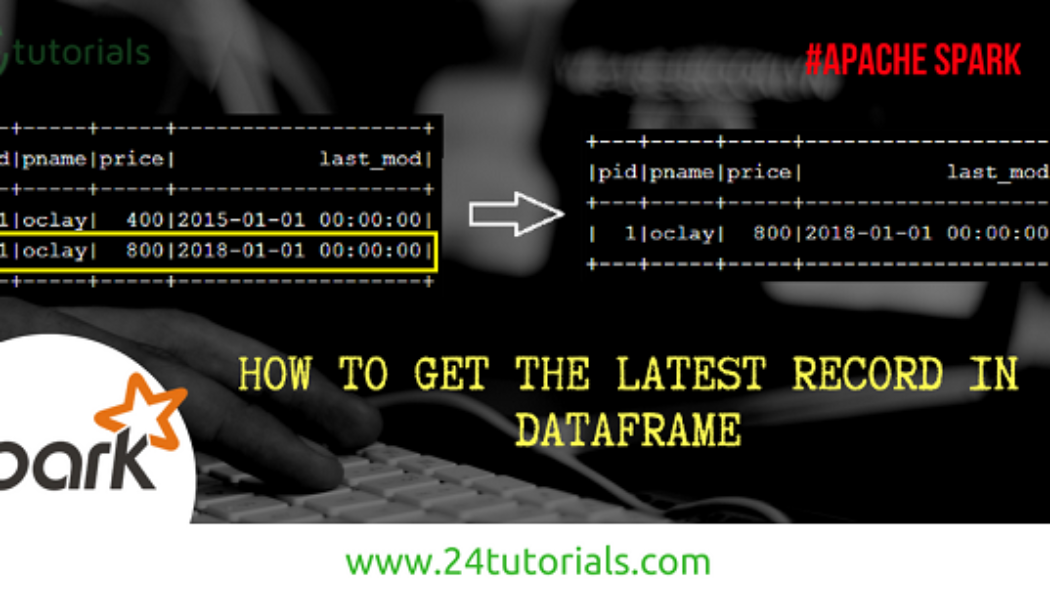

How to get latest record in Spark Dataframe
scala> val inputDF = sc.parallelize(Seq((1,"oclay",400,"2015-01-01 00:00:00"),(1,"oclay",800,"2018-01-01 00:00:00"))).toDF("pid","pname","price","last_mod") scala> inputDF.show +---+-----+-----+-------------------+ |pid|pname|price| last_mod| +---+-----+-----+-------------------+ | 1|oclay| 400|2015-01-01 00:00:00| | 1|oclay| 800|2018-01-01 00:00:00| +---+-----+-----+-------------------+ scala> import org.apache.spark.sql.DataFrame import org.apache.spark.sql.expressions._ import org.apache.spark.sql.functions._ def getLatestRecs(df: DataFrame, partition_col: List[String], sortCols: List[String]): DataFrame = { val part = Window.partitionBy(partition_col.head,partition_col:_*).orderBy(array(sortCols.head,sortCols:_*).desc) val rowDF = df.withColumn("rn", row_number().over(part)) v...


How to filter DataFrame based on keys in Scala List using Spark UDF [Code Snippets]
There are some situations where you are required to Filter the Spark DataFrame based on the keys which are already available in Scala collection. Let’s see how we can achieve this in Spark. You need to use spark UDF for this – Step -1: Create a DataFrame using parallelize method by taking sample data. scala> val df = sc.parallelize(Seq((2,"a"),(3,"b"),(5,"c"))).toDF("id","name") df: org.apache.spark.sql.DataFrame = [id: int, name: string] Step -2: Create a UDF which concatenates columns inside dataframe. Below UDF accepts a collection of columns and returns concatenated column separated by the given delimiter. scala> val concatKey = udf( (xs: Seq[Any], sep:String) => xs.filter(_ != null).mkString(sep)) concatKey: org.apache.spark.sql.UserDefinedFunction = UserDefinedFu...

Caching and Persistence – Apache Spark
Caching and Persistence- By default, RDDs are recomputed each time you run an action on them. This can be expensive (in time) if you need to use a dataset more than once. Spark allows you to control what is cached in memory. [code lang=”scala”]val logs: RDD[String] = sc.textFile("/log.txt") val logsWithErrors = logs.filter(_.contains("ERROR”)).persist() val firstnrecords = logsWithErrors.take(10)[/code] Here, we cache logswithErrors in memory. After firstnrecords is computed, Spark will store the contents of firstnrecords for faster access in future operations if we would like to reuse it. [code lang=”scala”]val numErrors = logsWithErrors.count() //faster result[/code] Now, computing the count on logsWithErrors is much faster. There are many ways to c...
